Currently Empty: €0.00
The best webcam should make you look your best, no matter if you’re in a dimly lit bedroom or home office. We’ve tested all the options out there to find the best ones to grab, including options best suited to video calls at work and those intended for streaming to your adoring fans.
If you’re looking for the best webcam overall, that would be the Elgato Facecam MK. 2. It’s incredibly versatile and boasts superb picture quality, as well as some quality-of-life features content creators will appreciate. Importantly, it’s a major improvement on the original Facecam, but notably cheaper too. If you’re simply looking for the best picture quality at a reasonable price, the Logitech C920 is a solid 1080p webcam choice, even after all these years.
Many of these webcams support 1080p, some at 60 fps, and a few at 4K, which adds to the price tag. If you’re perfecting your streaming set-up, you might want that higher frame rate capability, but you really want a webcam that deals well with the lighting conditions wherever you’re streaming from. An extra light will also go a long way to improving picture quality.
If you own — or plan to buy — a top-of-the-line laptop, you probably don’t need a separate webcam. The cameras built into new machines such as recent MacBook Pro models are more than good enough for everyday Zoom calls.
But if you’re making do with an older laptop, working from a desktop computer, or simply looking for more advanced features than your built-in webcam provides, the Logitech Brio 505 is your best option.
Its image quality is excellent right out of the box — no adjustments necessary — and it has features that are usually found only in more expensive models, including subject tracking.
It’s impossible to recommend a universally perfect webcam, because there are so many different ways to use webcams these days. There are also many different types of webcams: from standard HD (1080p) to 4K resolution, with different lenses, sensors, and software (including various types of “AI-powered” features). Don’t just grab an ultra high-res 4K webcam and call it a day — higher resolution doesn’t automatically mean better picture quality. Plus, the most common video conferencing platforms, such as Zoom, Google Meet, and Microsoft Teams, don’t even support resolutions higher than 1080p.
We’ve tested dozens of webcams to determine the best webcam for every situation — whether you’re trying to appear professional and put-together in front of colleagues while working from home, keep in touch with friends and family on the other side of the planet, or livestream content to millions of viewers.
Elgato Facecam MK.2
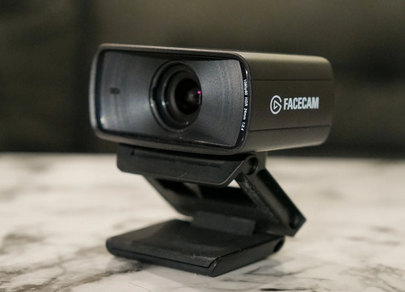
The Elgato Facecam MK.2 makes some marked improvements over the original Elgato Facecam that IGN expert Chris Coke reviewed back in 2022. The one major disappointment was the lack of HDR, and the Facecam MK.2 remedies the problem. It’s HDR-enabled and makes other improvements to picture quality, handling highlights and shadows well, and managing to capture impressive detail and rich colors. It even performs decently in dimly lit spaces for a natural, smooth image; this camera is hovering around DSLR-level performance.
When using a USB 3.0 connection, the Facecam MK.2 delivers an uncompressed 1080p picture at up to 60 fps for a cleaner, more detail-rich stream. And while it may not offer 4K support, the lower resolution requires less bandwidth and encoding, resulting in a more stable stream. Or opt for 120fps in 720p for some epic slomo shots. I’m also a big fan of the fixed focus, eliminating the worry of the camera losing focus when moving around the frame.
While the Facecam MK.2 looks decent out of the box, dialing in settings isn’t a bad idea. Elgato’s Camera Hub software is a bit clunky but sets itself apart from others by offering DSLR-like controls for more fine-tuned adjustments to camera settings; it can be especially helpful in low-light situations. All the typical slider adjustments for saturation, contrast, and more are available, with the option for automatic adjustments. However, I’d recommend doing it manually. Settings can then be saved to the camera’s flash memory. Streamers can also make changes to the picture with OBS, but the Camera Hub is a better option.
Logitech Brio 500
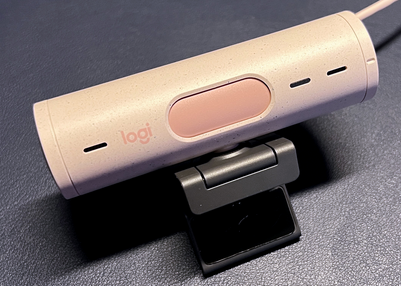
The Logitech Brio 500 is the first new Logitech webcam for non-creators in over a decade, and while its 1080p/30fps resolution may sound underwhelming, its performance is not. Armed with a flexible 90-degree field of view and Logitech’s “RightLight 4” image adjustment technology, the Brio 500 produces an impressive, exposure-balanced image right out of the box and is a great choice for most people.
We were especially impressed with the Brio 500’s auto-white balance, which is something almost all webcams struggle with: it wasn’t perfect, but it was almost as impressive as the auto-white balance seen on much pricier webcams, such as the Insta360 Link. Logitech’s “RightLight 4” technology, which is designed to compensate for less-than-ideal lighting situations, did an excellent job of producing flattering, evenly-lit images in both low and overexposed lighting.
The Logitech Brio 500 is a great example of how higher resolution doesn’t automatically mean better picture quality — it may have the same surface-level specs as older Logitech webcams, such as the C920s and C930e, but it produces much better images. For the average person looking to upgrade their webcam from whatever’s built into their laptop’s bezel — or even from an older Logitech model — the Logitech Brio 500 offers the best out-of-the-box performance at a reasonable price ($130), with more modern software and a convenient USB-C connection.
Anker PowerConf C200
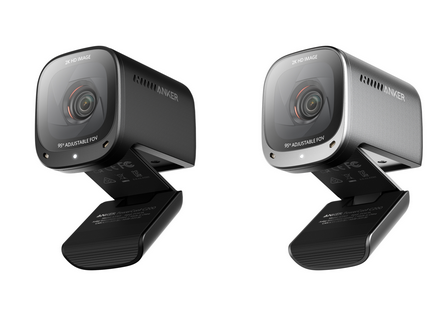
The Anker PowerConf C200 has a sharp 2K resolution and automatically adjusts its aperture setting to optimize your picture no matter the lighting conditions. You can switch between a 65-degree view that keeps you centered, a 78-degree view that fits two people side-by-side or a 95-degree field of view that captures more of your space. It also has dual microphones that are AI-assisted to block out unwanted background noise, so your viewers will hear you, not the din around you.
Some users complained the colors it captures look rather washed out, so if you need true color authenticity, keep shopping. This camera has a privacy cover that snaps shut quickly, a feature some pricier webcams lack.
Obsbot Meet 2
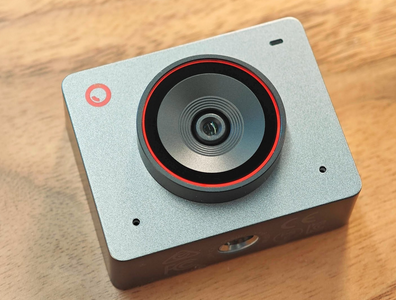
Combining a great 4K picture, tiny build, and intuitive AI enhancements, all for a shockingly great price, the Obsbot Meet 2 is perfect for streamers who want to skip the mirrorless camera setup for something more compact. IGN expert Chris Coke had the opportunity to conduct some hands-on testing of the Obsbot Meet 2, even stating that it has an “image quality that competes with some of the best webcams available today at a budget-friendly price.”
The most striking aspect of Obsbot’s Meet 2 is its size, measuring less than two inches square. But even if it’s small, the webcam is mighty, with a durable metal build and features a large 1/2-inch CMOS sensor and f/1.8 aperture lens to perform better in low light. Strong magnets are conveniently used for mounting, but can make adjustments a bit finicky. A microphone is even on board, while I wouldn’t rely on it for streaming, it’s helpful for occasional Teams or Zoom meetings.
Unlike our top pick, the Obsbot Meet 2 4K supports a slightly sharper resolution of up to 4K30, in addition to the same 1080p60 resolution. The FOV is narrower at 79°, so you can’t show off as much of your streaming setup. In normal and low-light situations, the picture remained crisp and clear during testing. Dark rooms brought expected graininess, but still maintained details and color accuracy intact, while offering smooth motion. However, HDR was less impressive overall, but in certain light conditions helps balance the picture.
Conclusion: Choosing the Right Webcam for Gaming and Streaming
In conclusion, selecting the right webcam is a key step in building a professional and engaging gaming or streaming setup. A high-quality webcam enhances your on-screen presence with sharper resolution, smoother frame rates, and better low-light performance — all of which help keep viewers focused and engaged. Modern options now include advanced features like AI tracking, HDR, and customizable settings, allowing streamers to fine-tune their visuals for any platform or environment. With the right balance of performance, reliability, and ease of use, investing in a solid webcam ensures your content looks polished and stands out in an increasingly competitive streaming space.